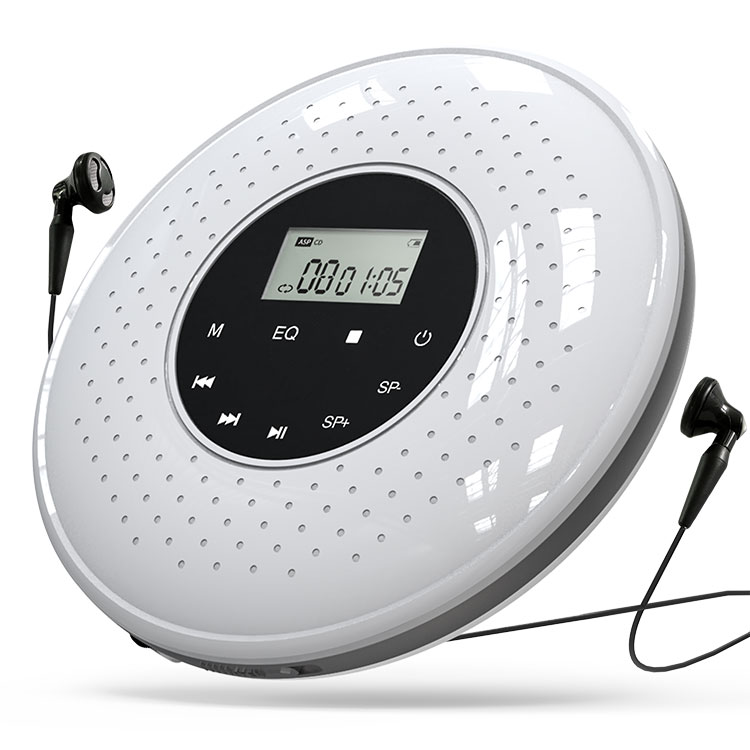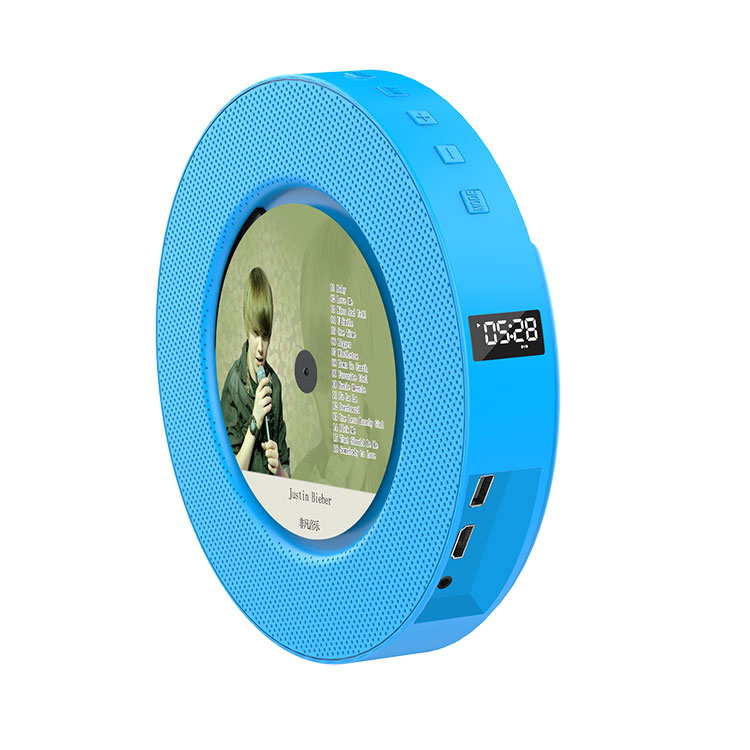

A portable CD player is judged by how quickly a user can start, pause, skip, and navigate without looking at a manual. The playback controls are the interface between the listener and the disc, and their design determines whether the product feels intuitive or frustrating. For a procurement manager sourcing CD Players for retail, education, or accessible listening markets, the control set is not a cosmetic detail. It is the specification that decides whether the product can be used one-handed on a commute, by an older user with limited dexterity, or by a child in a classroom. The controls that matter most are the ones that reduce the number of steps between an intention and an action.
This guide is written for buyers who are evaluating portable CD players for different user groups. It explains which playback controls have the greatest impact on ease of use, how the physical layout and the display work together, which mode functions are essential and which are optional, how accessibility features change the control requirement, and how buyers should verify the control performance before placing an order. The content is organized around the user tasks rather than the component list, and it includes the product parameters and documentation that a reliable supplier should provide. Our factory at Shenzhen Yiruiyoupin Technology Co., Ltd. designs CD Players with control layouts for different market segments, and the guidance below reflects the engineering and procurement questions we address with our customers.
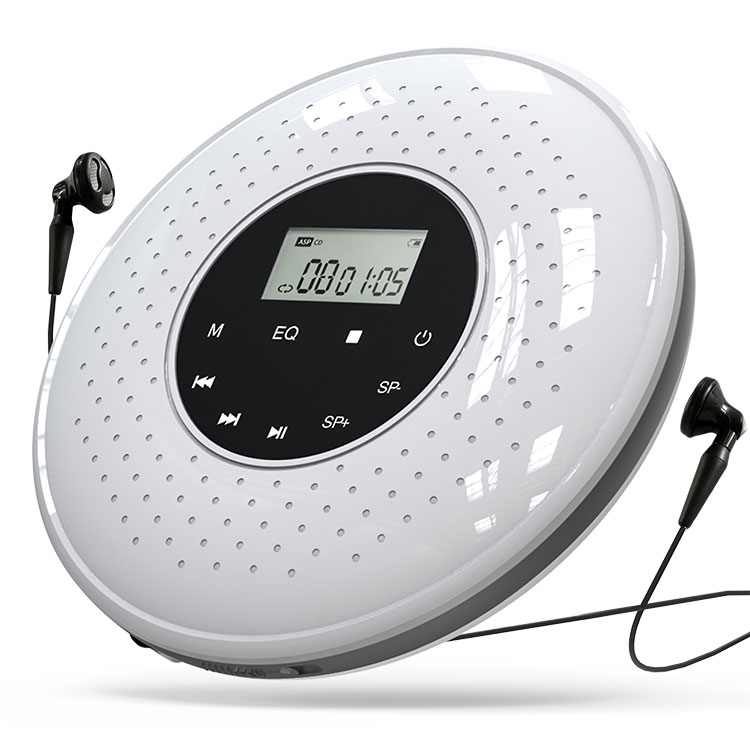
The core playback controls are play, pause, stop, skip forward, skip backward, and volume. These are the controls that a user touches in almost every listening session, and their design determines the basic usability of the CD Player. A product that gets these controls right feels natural. A product that gets them wrong feels awkward, regardless of how many additional features it offers. The essential controls can be grouped into three functions: transport (play, pause, stop), track navigation (skip forward and backward), and level control (volume). The table below summarizes the essential controls and their design requirements.
| Control | Function | Design Requirement | Procurement Check |
| Play/Pause | Start or pause playback | Single button with clear icon, tactile feedback | Confirm the pause state is visible on the display |
| Stop | Stop playback and reset the track position | Separate from pause, or a long-press function | Confirm the stop function is distinct from pause |
| Skip forward | Advance to the next track | Large button, reachable with the thumb | Confirm the skip function works during playback |
| Skip backward | Return to the previous track | Large button, mirrored position to skip forward | Confirm the skip function works during playback |
| Volume | Adjust the listening level | Dedicated wheel or buttons, not buried in a menu | Confirm the volume control is independent of the display |
The design of the play/pause button is the most important detail in the core set. A separate play and pause button requires the user to find two buttons, while a combined play/pause button requires the user to remember the state. The combined button is more efficient when the state is visible on the display, because the user can glance at the display and press the same button. A separate stop button is also important because many users expect to stop playback and return to the beginning of the disc, rather than pause in place. The skip buttons should be large enough to find by touch, and they should be positioned where the thumb naturally rests.
Our factory at Shenzhen Yiruiyoupin Technology Co., Ltd. designs the core controls of our CD Players around the one-handed use case. We place the play/pause button at the center of the control cluster, the skip buttons on either side, and the volume wheel on the edge of the housing. We test the button force and the tactile feedback to confirm that the controls can be operated without looking. The goal is to make the essential controls usable in the situations where a portable CD player is actually used, such as walking, commuting, or listening in a dimly lit room.
For a buyer, the core control check should be a physical sample test. Press each button, confirm the travel and the click, and try to operate the controls with one hand. A product that passes the specification but feels awkward in the hand will generate returns and complaints. The procurement team should also confirm that the button labels are legible and that the icons follow the conventions that users already know.
The display and the navigation controls determine whether the user can find a specific track, confirm the playback state, and understand the remaining time. A portable CD Player with a small display and no navigation controls forces the user to skip through tracks one by one. A CD Player with a clear display and folder navigation allows the user to move directly to the desired track. The navigation controls include the track number display, the time display, the folder or album navigation, and the search function. The table below compares the navigation capabilities of a basic display and an advanced display.
| Navigation Feature | Basic Display | Advanced Display | User Benefit |
| Track number | Two-digit LED | Multi-line LCD | Shows the current track and total tracks |
| Time display | Elapsed time only | Elapsed and remaining time | Helps the user plan the listening session |
| Folder navigation | Not available | Folder and file list | Allows direct access to MP3 folders |
| Search | Skip only | Direct track entry or alphabetical search | Reduces the steps to reach a specific track |
| Playback state | Play icon only | Play, pause, stop, repeat, random icons | Confirms the current mode without guessing |
The display and the navigation controls work together. A display that shows the track number but does not show the folder name is less useful for an MP3 disc with multiple folders. A navigation control that allows direct track entry but a display that cannot show the entered number is frustrating. The best combination is a display that shows the current track, the total tracks, the elapsed time, the remaining time, and the active mode, paired with navigation controls that allow skip, folder change, and direct track entry. This combination reduces the number of steps between the user's intention and the desired track.
Our factory at Tompire offers CD Players with both basic and advanced display configurations. We specify the display type, the character size, the backlight, and the navigation controls for each model. We also test the display legibility in different lighting conditions, because a portable CD Player is often used outdoors or in a car. The goal is to provide a display and navigation set that matches the user's task, not just the bill of materials.
For a buyer, the display and navigation check should include a task test. Ask a sample user to find track 12 on a disc with 20 tracks, and observe the number of steps and the time required. Repeat the test with a disc that contains multiple folders. A product that requires many steps or that confuses the user will not deliver the ease of use that the market expects. The procurement team should also confirm that the display is readable in sunlight and that the backlight does not drain the battery excessively.
The mode and function controls extend the CD Player beyond simple playback. The most useful modes are repeat, random, program, and A-B repeat. The repeat mode allows the user to repeat a track or the entire disc. The random mode allows the user to shuffle the playback order. The program mode allows the user to create a custom playlist. The A-B repeat mode allows the user to repeat a specific passage, which is useful for language learning, music practice, and exercise routines. The table below summarizes the mode controls and their applications.
| Mode | Function | Typical Application | Procurement Note |
| Repeat | Repeat one track or the entire disc | Music practice, background listening | Confirm the mode is visible on the display |
| Random | Shuffle the playback order | Casual listening, parties | Confirm the shuffle does not repeat tracks |
| Program | Create a custom playback list | Workout routines, DJ practice | Confirm the program memory is retained |
| A-B repeat | Repeat a selected passage | Language learning, music practice | Confirm the A and B points are easy to set |
The mode controls should be accessible without entering a deep menu. A dedicated mode button that cycles through the options is easier to use than a combination of button presses. The display should show the active mode so that the user does not have to remember the setting. The A-B repeat function should allow the user to set the A point and the B point with two button presses, and the display should show the loop range. A product that buries the mode controls in a menu will not be used to its full potential, and the buyer will not capture the value of the additional functions.
Our factory at Shenzhen Yiruiyoupin Technology Co., Ltd. designs the mode controls of our CD Players with a dedicated mode button and a clear display indicator. We also provide the instruction manual with a quick reference card that explains the mode functions. The goal is to make the additional functions accessible to the average user, not just to the technical enthusiast. We test the mode controls with sample users to confirm that the functions can be activated without the manual.
For a buyer, the mode control check should include a usability test for each function. Ask a sample user to set the repeat mode, the random mode, and the A-B repeat mode, and observe the time and the number of steps required. A product that requires the manual for every mode will not be used to its full potential. The procurement team should also confirm that the mode settings are retained when the player is paused or stopped, because a mode that resets unexpectedly is a source of frustration.
The physical layout and the ergonomics of the controls determine whether the CD Player can be used comfortably for an extended period. The key factors are the button placement, the button size, the button travel, the tactile feedback, and the resistance to accidental activation. A portable CD Player is often held in one hand or placed on a surface, and the controls should be reachable with the thumb or the index finger without changing the grip. The table below compares the layout choices and their effect on usability.
| Layout Choice | Effect on Usability | Typical Application | Procurement Check |
| Top-mounted cluster | Reachable with the thumb when held in one hand | Portable, handheld use | Confirm the cluster is within thumb reach |
| Front-mounted cluster | Reachable when the player is on a table | Desktop, study, classroom | Confirm the buttons are visible from the front |
| Side-mounted volume wheel | Adjustable without looking | Walking, commuting | Confirm the wheel has a tactile detent |
| Recessed buttons | Resists accidental activation in a bag | Travel, pocket storage | Confirm the recess does not make the button hard to press |
The button travel and the tactile feedback are as important as the placement. A button with a short travel and a soft click is easy to press but may be activated accidentally. A button with a longer travel and a firm click is more deliberate but requires more force. The ideal is a button with a distinct tactile break and a travel of about 0.5 mm to 1.0 mm. The volume wheel should have a detent so that the user can feel each step without looking at the display. The hold switch, which locks the controls to prevent accidental activation, is a useful addition for portable use. Our factory at Shenzhen Yiruiyoupin Technology Co., Ltd. specifies the button force, the travel, and the tactile feedback for each CD Player model, and we test the layout with sample users in the intended use position.
For a buyer, the layout check should be a hands-on test. Hold the player in one hand and try to operate the play/pause and skip buttons with the thumb. Place the player on a table and try to operate the front controls. Put the player in a bag and check whether the buttons are accidentally pressed. A product that passes the electrical test but fails the ergonomic test will generate returns and complaints. The procurement team should also confirm that the hold switch is intuitive and that the display is visible in the held position.
The accessibility and safety controls determine whether the CD Player can be used by older users, users with limited vision, and users with limited dexterity. The most important accessibility features are the large button size, the high-contrast labels, the tactile markers on the play and skip buttons, the voice confirmation of the button press, and the volume limit. The safety features include the hold switch, the battery compartment lock, and the earphone volume limit. The table below summarizes the accessibility and safety controls and their benefits.
| Control | Accessibility or Safety Benefit | Target User | Procurement Check |
| Large buttons | Easier to locate and press | Older users, users with limited dexterity | Confirm the button size and spacing |
| High-contrast labels | Easier to read in low light | Users with low vision | Confirm the label contrast ratio |
| Tactile markers | Identifies the play and skip buttons by touch | Users with low vision | Confirm the markers are distinct |
| Hold switch | Prevents accidental activation | All portable users | Confirm the switch is easy to operate |
| Volume limit | Protects hearing | Children, all users | Confirm the limit is adjustable or fixed |
The accessibility features are not only for users with disabilities. They improve the experience for all users in situations where the player is used in low light, with one hand, or in a hurry. The tactile markers on the play and skip buttons are a simple addition that makes the player easier to use without looking. The high-contrast labels are useful in a car or outdoors. The hold switch is essential for portable use because it prevents the battery from draining when the player is in a bag. Our factory at Shenzhen Yiruiyoupin Technology Co., Ltd. offers accessibility options for our CD Players, including large buttons, tactile markers, and a volume limit. The goal is to provide a product that can be used by the widest possible group of listeners.
For a buyer, the accessibility check should include a sample test with older users or users with limited dexterity. Ask them to locate the play button, the skip button, and the volume control without looking. Ask them to read the display in low light. A product that is difficult to use for these users will not serve the accessible listening market. The procurement team should also confirm that the safety features meet the destination market's requirements for hearing protection and battery safety.
Question 1: Is a separate play and pause button easier to use than a combined button?
Answer: A combined play/pause button is generally easier to use when the display clearly shows the current state, because the user presses the same button to start or pause. A separate play and pause button requires the user to find two buttons, which can be slower in low light. The best design is a combined button with a clear state indicator on the display, plus a separate stop button for users who want to reset the track position.
Question 2: Why is the hold switch important on a portable CD player?
Answer: The hold switch locks the controls so that the player does not respond to accidental button presses when it is carried in a bag or a pocket. Without a hold switch, the battery can drain and the playback position can change unexpectedly. The switch should be easy to operate and should have a clear indicator so that the user knows when the controls are locked.
Question 3: What display features make a portable CD player easier to use?
Answer: A clear display with track number, total tracks, elapsed time, remaining time, and active mode icons makes the player easier to use. A backlit display improves readability in low light. A multi-line display that can show folder names is useful for MP3 discs. The display should be readable in sunlight and should not drain the battery excessively. The buyer should test the display in the intended use conditions.
Question 4: Which mode controls are most useful for everyday listening?
Answer: Repeat and random are the most useful mode controls for everyday listening. Repeat allows the user to repeat a track or the disc, and random shuffles the playback order. A dedicated mode button that cycles through the options and a display indicator for the active mode are easier to use than a menu-based system. A-B repeat is useful for language learning and music practice but is less essential for general listening.
Question 5: What accessibility features should I look for in a portable CD player?
Answer: Look for large buttons with tactile markers on the play and skip functions, high-contrast labels, a clear backlit display, a hold switch, and a volume limit. These features make the player easier to use for older users, users with low vision, and users with limited dexterity. The buyer should test the player with representative users to confirm that the accessibility features are effective in practice.
The playback controls that make a portable CD Player easier to use are the ones that reduce the steps between intention and action. The core controls, the display and navigation, the mode functions, the physical layout, and the accessibility features all contribute to the usability of the product. For procurement teams, the evaluation should be based on a sample test with representative users, not only on the specification sheet. The product that passes the ergonomic and accessibility tests will deliver a better user experience and fewer returns. Our factory at Shenzhen Yiruiyoupin Technology Co., Ltd. designs CD Players with control layouts for different market segments, and we provide the samples and documentation that buyers need to verify the usability. If you are sourcing CD Players for retail, education, or accessible listening markets, contact our team to discuss the control set and the usability requirements for your target users.
Contact Shenzhen Yiruiyoupin Technology Co., Ltd. today to discuss your CD Player requirements and to request the control layout and usability documentation for your target market.
-